This post documents my attempt to implement Partytown on a .NET Core 6 web application — not a React app, just plain HTML, JS, and CSS built with Webpack. It is an honest account of what worked, what did not, and why I ultimately decided not to ship it.
Why Partytown?
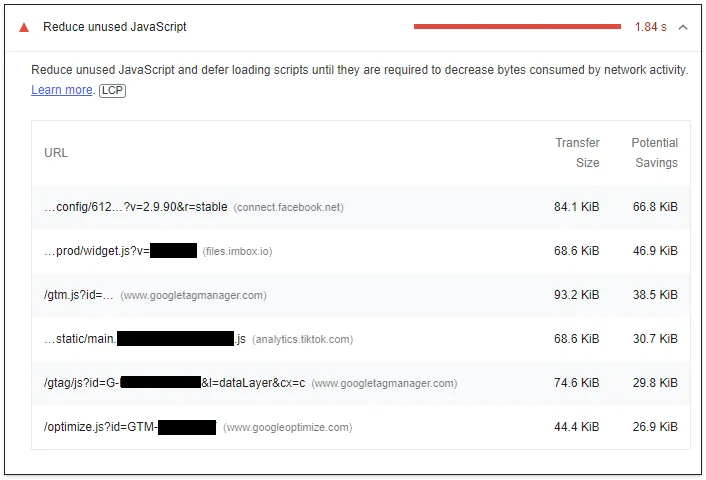
After a year of deep diving into web performance, the last major performance issue on my client’s site was third-party scripts. The full list:
- Google Tag Manager
- Google Optimize
- Facebook/Meta Pixel
- TikTok Pixel
- Hotjar
These scripts are loaded synchronously on every page and are the single largest contributor to poor Total Blocking Time (TBT) and Largest Contentful Paint (LCP). Removing them is not an option — they are business-critical. The only alternative is to move them off the main thread, which is exactly what Partytown promises.
Partytown runs third-party scripts inside a web worker, communicating with the main thread via a synchronous-looking API backed by SharedArrayBuffer and Atomics. In theory, the main thread stays unblocked and performance metrics improve significantly.
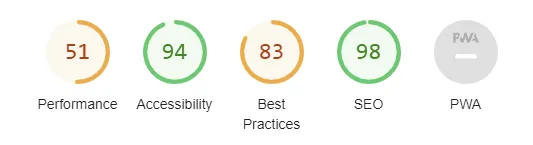
Here are the metrics before attempting Partytown:

Part 1 - The snippet
Install the NPM package and configure Webpack to copy the Partytown library files into your build output. I created a dedicated entry point for the Partytown config:
// partytownConfig.js
window.partytown = {
  lib: `${__PUBLIC_PATH__}js/~partytown/`,
  forward: ['ttq.track', 'ttq.page', 'ttq.load', 'dataLayer.push', 'fbq']
}
__PUBLIC_PATH__ is injected via Webpack’s DefinePlugin. The entry point is configured with runtime: false so it can be safely inlined into the HTML <head> without a Webpack runtime context:
'partytownConfig': {
  import: './js/app/partytownConfig.js',
  runtime: false
},
In the Razor layout, inline both the config and the Partytown snippet as high as possible in <head>:
<script>
    @Html.Raw(WebAssets.GetContent("js/partytownConfig.js"))
</script>
<script>
    @Html.Raw(WebAssets.GetContent("js/partytown.js"))
</script>
Then change all third-party script tags from type="text/javascript" to type="text/partytown".
Results
Partytown loaded and started proxying requests:

313 requests went through Partytown’s proxy. However, most third-party scripts failed to load:
| Script | Status |
|---|---|
| Google Tag Manager | ✅ |
| Google Analytics | ❌ |
| Google Optimize | ✅ |
| Facebook Pixel | ❌ |
| TikTok Pixel | ❌ |
| ❌ | |
| Hotjar | ❌ |
| Imbox | ❌ (incompatible) |
The common failure mode was CORS. When Partytown’s web worker tries to fetch a third-party script, the request comes from a worker origin — not the page origin — and most CDNs block it.

Part 2 - The reverse proxy
Partytown’s documented solution to CORS is to route third-party requests through a reverse proxy on your own domain. In .NET Core, YARP’s direct forwarding makes this straightforward:
public static IEndpointRouteBuilder MapForwarder(this IEndpointRouteBuilder builder, IApplicationBuilder app)
{
    var forwarder = app.ApplicationServices.GetRequiredService<IHttpForwarder>();

    var httpClient = new HttpMessageInvoker(new SocketsHttpHandler()
    {
        UseProxy = false,
        AllowAutoRedirect = false,
        AutomaticDecompression = DecompressionMethods.None,
        UseCookies = false,
        ActivityHeadersPropagator = new ReverseProxyPropagator(DistributedContextPropagator.Current)
    });

    var transformer = new CustomTransformer();
    var requestConfig = new ForwarderRequestConfig { ActivityTimeout = TimeSpan.FromSeconds(100) };

    builder.Map("/reverse-proxy/", async (ctx) =>
    {
        if (ctx.Request.Query.TryGetValue("url", out var url))
        {
            var error = await forwarder.SendAsync(ctx, url, httpClient, requestConfig, transformer);

            if (error != ForwarderError.None)
            {
                var errorFeature = ctx.GetForwarderErrorFeature();
                var exception = errorFeature.Exception;
            }
        }
    });

    return builder;
}

private class CustomTransformer : HttpTransformer
{
    public override async ValueTask TransformRequestAsync(HttpContext httpContext,
        HttpRequestMessage proxyRequest, string destinationPrefix)
    {
        await base.TransformRequestAsync(httpContext, proxyRequest, destinationPrefix);
        proxyRequest.RequestUri = new Uri(destinationPrefix);
        proxyRequest.Headers.Host = null;
    }
}
Register the forwarder and map the endpoint in Startup.cs:
public void ConfigureServices(IServiceCollection services)
{
    services.AddHttpForwarder();
}

public void Configure(IApplicationBuilder app, IWebHostEnvironment env)
{
    app.UseEndpoints(endpoints =>
    {
        endpoints.MapForwarder(app);
    });
}
Then tell Partytown to route external script requests through it:
window.partytown = {
  lib: `${__PUBLIC_PATH__}js/~partytown/`,
  forward: ['ttq.track', 'ttq.page', 'ttq.load', 'dataLayer.push', 'fbq'],
  resolveUrl: (url, location, type) => {
    if (url.hostname === location.hostname) {
      return url;
    }

    if (type === 'script') {
      const proxyUrl = new URL(`${location.origin}/reverse-proxy/`);
      proxyUrl.searchParams.append('url', url.href);
      return proxyUrl;
    }

    return url;
  },
}
Results with the reverse proxy
| Script | Status |
|---|---|
| Google Tag Manager | ✅ |
| Google Analytics | ✅ |
| Google Optimize | ✅ |
| Facebook Pixel | ✅ |
| TikTok Pixel | ✅ |
| ❌ | |
| Hotjar | ❌ |
| Imbox | ❌ (incompatible) |
Most scripts now loaded. Pinterest and Hotjar continued to fail — a known issue in the Partytown repo with no resolution at the time of writing.
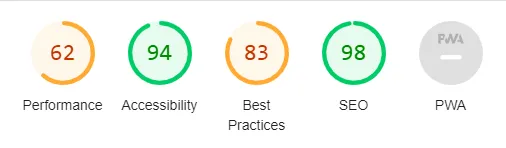
The performance metrics improved, though less dramatically than hoped:
Why I did not ship it
After getting most scripts loading, I stopped short of deploying to production. Here is why.
Hotjar and Pinterest would be silently broken. These are business-tracked pixels. Deploying a change that silently drops two tracking scripts without a plan to fix them is not a viable option.
The reverse proxy is a security and privacy concern. Routing all third-party traffic through your own domain means your server is making arbitrary outbound HTTP requests based on query string parameters. This needs rate limiting, an allowlist, and careful review — none of which were trivial to add quickly.
Partytown is poorly maintained. Looking at the GitHub issue tracker, there are many open issues with long waits for responses. The project has not seen active development for a significant period. Betting production performance on an unmaintained library adds long-term risk.
The gains were smaller than expected. Even with most scripts working through the reverse proxy, the Lighthouse improvement was modest. The scripts were moved off the main thread in theory, but the overhead of the worker communication and the proxy round-trips offset some of the benefit.
What I would recommend instead
For most sites, the better options are:
- Defer non-critical scripts — move analytics and pixels to
deferor load them after theloadevent. Simpler, well-supported, and predictable. - Use a tag manager firing rule — configure GTM to delay firing pixels until after user interaction or a time delay.
- Audit and remove unused scripts — in my experience, at least one or two tracking scripts on most sites are either duplicated or abandoned.
Partytown is a genuinely interesting idea and it may mature into a reliable tool. As of late 2022, it was not ready for a production site with a diverse set of third-party scripts.